Access Log Fields
Summary
The Access Log Fields setting controls which fields will be included in the access logs. For each incoming request, the proxy service will emit a log entry with the message http-request containing these fields.
The default log fields should be appropriate for most deployments.
How to configure
- Core
- Enterprise
- Kubernetes
- Enterprise via Terraform
| Config file key | Environment variable | Type | Default |
|---|---|---|---|
access_log_fields | ACCESS_LOG_FIELDS | Array of strings | See Access Fields and Defaults |
Examples
access_log_fields:
  - authority
  - duration
  - path
ACCESS_LOG_FIELDS=authority,duration,path
Custom headers example:
access_log_fields:
  - headers.user-agent
  - headers.content-type
ACCESS_LOG_FIELDS=headers.user-agent,headers.content-type
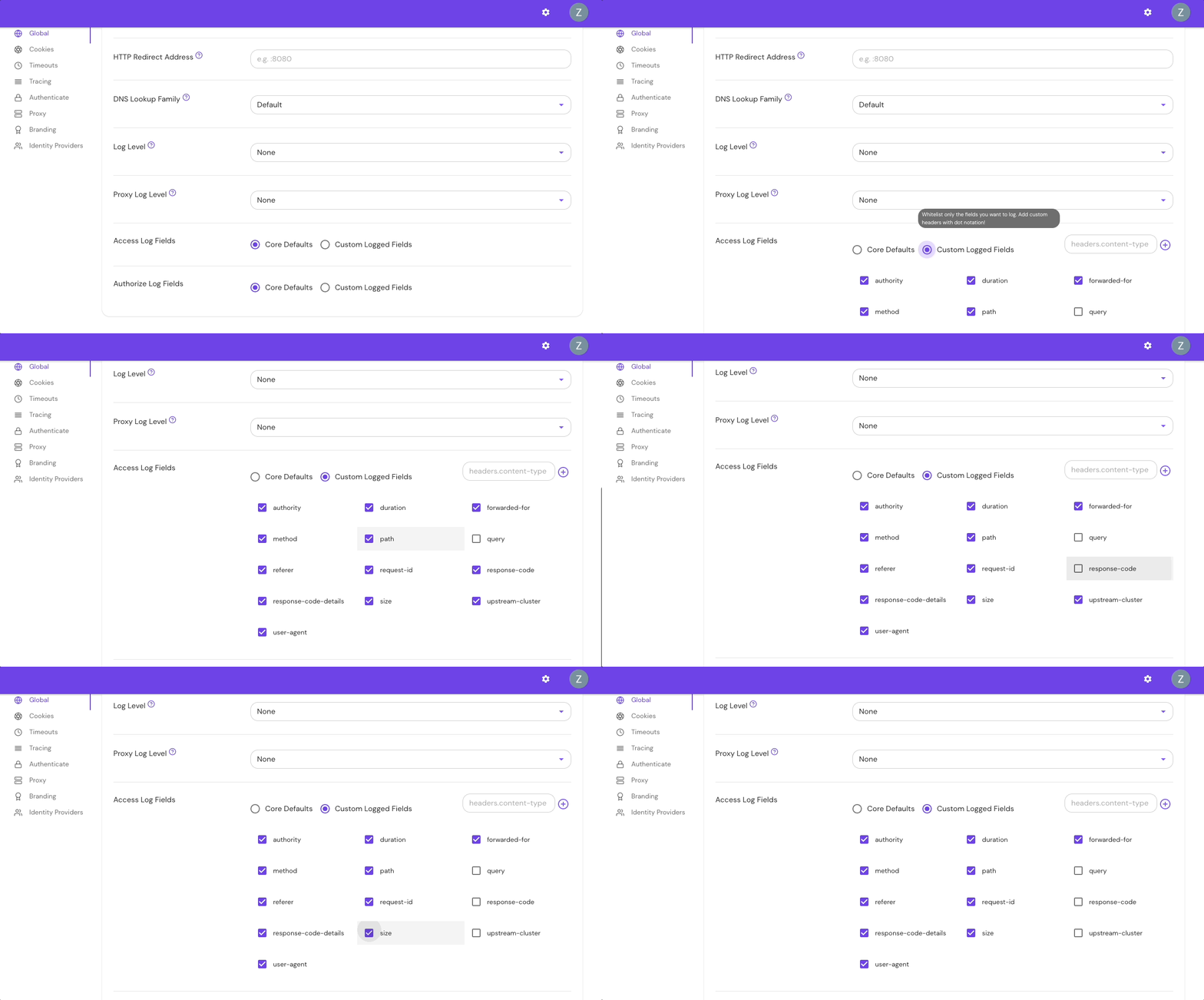
Configure Access Log Fields in the Console:
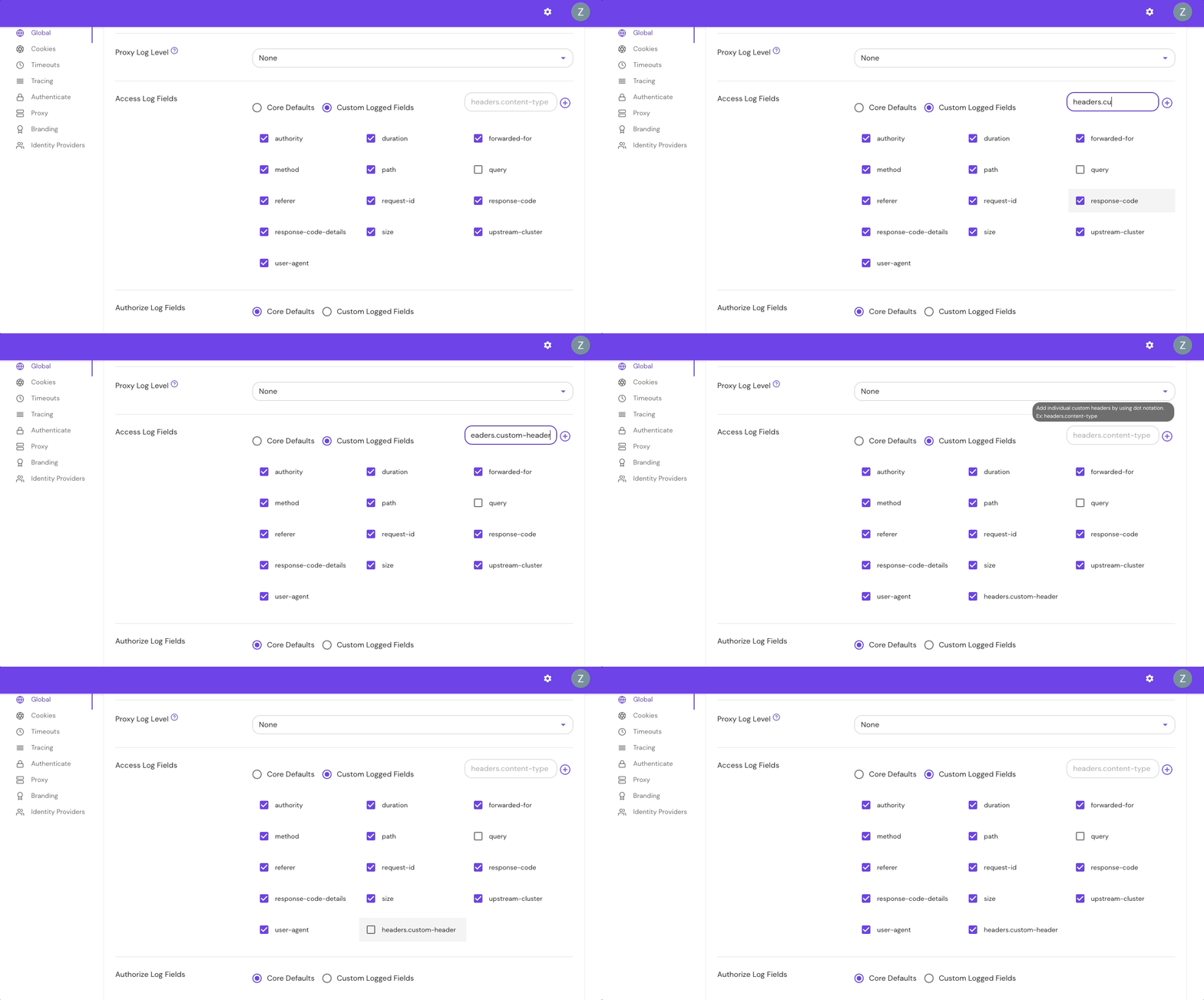
Add Custom Headers in the Console:
| Parameter name | Type | Default |
|---|---|---|
accessLogFields | Array of strings | See Access Fields and Defaults |
Examples
accessLogFields:
  - authority
  - duration
  - path
Custom headers example
accessLogFields:
  - headers.user-agent
  - headers.content-type
| Parameter name | Type | Default |
|---|---|---|
accessLogFields | Set of strings | See Access Fields and Defaults |
Examples
access_log_fields = ["authority", "duration", "path"]
Custom headers example
access_log_fields = ["headers.user-agent", "headers.content-type"]
Access log fields and defaults
The table below lists all available access log fields:
| Field name | Description | Default field |
|---|---|---|
authority | The HTTP request :authority or Host header value. Can be a domain name or IP address and may contain a port number (for example, www.example.com) | Yes |
duration | The amount of time the request takes to complete in seconds | Yes |
forwarded-for | The value of the X-Forwarded-For header, as sent to the upstream service (see also X-Forwarded-For Settings) | Yes |
ip | The user's IP address. Note that this depends on setting the xff_num_trusted_hops option appropriately. | No |
method | The HTTP request method, such as GET, POST, or PUT | Yes |
path | The HTTP request path (for example, /some/path) | Yes |
referer | The HTTP request referer, or the address of the web page from which the resource has been requested | Yes |
request-id | The request's unique identifier as assigned by Pomerium | Yes |
response-code | The HTTP Response Code (for example 200 or 500) | Yes |
response-code-details | The response code details set by Envoy (for example, via_upstream or route_not_found; see the Envoy docs for more information) | Yes |
size | The HTTP Response size in bytes | Yes |
upstream-cluster | The cluster the request was sent to (the cluster name is assigned by Pomerium, for example route-3bb74f76f9d71f9c or pomerium-control-plane-http) | Yes |
user-agent | The User-Agent field sent by the user's browser | Yes |
query | The HTTP request query (for example, ?test=one&other=13) | No |
headers.{CustomHeaderName} | An HTTP Request Header identified by the HeaderName (for example, headers.X-Amzn-Trace-Id might return Root=1-64c03960-37809588421513e42f260f56) | No |
Query parameters often contain sensitive information. Do not enable the query log field without careful consideration.
Access log behavior
Find access logs
To find access logs logged by the proxy service, filter your Pomerium logs for entries containing "message": "http-request":
{
  "level": "info",
  "service": "envoy",
  "upstream-cluster": "route-6f431f0be965b608",
  "method": "GET",
  "authority": "verify.pomerium.com",
  "path": "/img/json.svg",
  "user-agent": "Mozilla/5.0 (Macintosh; Intel Mac OS X 10_15_7) AppleWebKit/537.36 (KHTML, like Gecko) Chrome/115.0.0.0 Safari/537.36",
  "referer": "https://verify.localhost.pomerium.io/index.css",
  "forwarded-for": "XXX.XXX.X.XXX",
  "request-id": "6f3ad640-cb15-48b4-b79f-9adb94dd654c",
  "duration": 224.860959,
  "size": 5127,
  "response-code": 200,
  "response-code-details": "via_upstream",
  "time": "2023-08-03T16:55:14-04:00",
  "message": "http-request"
}
Display specific logs
If access_log_fields is not defined, all the available default fields will be logged.
To log only a specific field, or multiple fields, add the desired field(s) to your configuration file.
For example, if you add the following fields to access_log_fields:
access_log_fields:
  - authority
  - path
Your logs would look similar to the below example:
{
  "level": "info",
  "service": "envoy",
  "authority": "verify.pomerium.com",
  "path": "/img/json.svg",
  "time": "2023-08-04T12:12:35-04:00",
  "message": "http-request"
}
Log custom headers fields
The headers.{CustomHeaderName} field allows you to enter custom headers. Adding one or multiple custom headers will display only those headers.
For example, if you add the following custom headers to access_field_logs:
access_log_fields:
  - headers.user-agent
  - headers.content-type
The custom headers will appear in the headers field:
{
  "level": "info",
  "service": "envoy",
  "headers": {
    "content-type": "application/json",
    "user-agent": "Mozilla/5.0 (Macintosh; Intel Mac OS X 10_15_7) AppleWebKit/537.36 (KHTML, like Gecko) Chrome/115.0.0.0 Safari/537.36"
  },
  "time": "2023-08-04T11:37:01-04:00",
  "message": "http-request"
}